FAQs
Which port in the wall jack do I use?
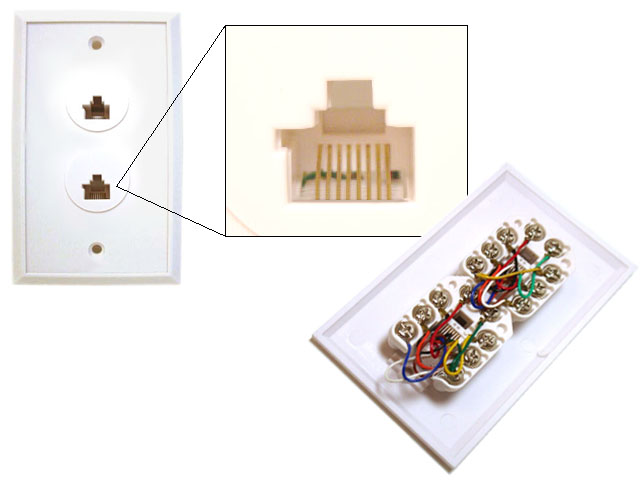
Customer may not know which port to plug into when setting up internet. Advise that the Ethernet port is usually the orange (data) port in the wall plate and looks like a wide phone jack.
Customer’s location is not on the Master List.
If a customer calls and you cannot find a location by the name or various parts of the address, then we do not support the property. If they were referred to us by an ISP, refer them back and advise we do not manage the location.
Do I need to give the customer the ticket number?
Yes. We need to fill the ticket out while on the call and provide every customer with the ticket number.
We are only tier 2 support for property.
If customers call or are referred to us by ISP and the master list states we are only tier 2 support, then search KMC for the property and make sure the customer has an account (create one if necessary) and make sure that the device in question is on the device list. If account looks good and no notes stating otherwise, refer back to the ISP and let the customer know everything is working on our end.
How do I find an account for property that is not in KMC?
If a property is not listed in KMC, then there is no need for an account and all account troubleshooting can be skipped at this point.
Caller does not see possibility to upgrade on their KMC page.
If KMC does not show possibility to upgrade, it means that the location is pinned on the default tier and there is no possibility to upgrade. Location may have ability to upgrade in the future, but not at the moment.
There are, however, a few sites that have speed upgrades which go through Time Warner. You can see the list of locations at http://www.hispeedup.com/
ISP tech or location office calls in.
If an ISP technician is on site and calls in refer them to the NOC at 855-655-2388. Do the same if a location office is having internet issues.
Customer cannot find UDF to power cycle.
If a resident is not able to locate the UDF or power cycle the UDF because it is locked we usually recommend that they call maintenance to perform the power cycle. However if maintenance said they won’t do it, or if the customer refuses to get maintenance, then advise that we can send it to a support agent to schedule someone do it, but it can take 24-48 hours to get a tech scheduled to come out.
How to handle a call spike.
From time to time we will get a large volume of calls from one location. In situations like this we need to first check the Korcett NOC outage list to see if there is a known issue for that location. If the location is in the outage list, ONLY the outage list, then we can get all of the customers information, document the ticket appropriately, let them know of the outage, provide them their ticket number and let them know that we are aware of the issue and will have it back up as fast as we can.
If there is no ticket in the outage list for the location, then make sure to handle the call and do FULL troubleshooting like you would normally do, fill the ticket out while you are on the call, and provide the ticket number to the customer after you finish the call. If you get multiple calls for the same location, then make sure to let a supervisor or a shift lead know, so they can make the Korcett NOC aware of the issue.
What is a MDU ID and where can I find it?
A MDU ID, or Multiple Dwelling Unit Identifier, is a number assigned to a property. This number is used to simplify reporting, KMC, Korcett configuration, and authentication as a whole. When a site is added to our KMC a MDU ID is generated (Sequentially). Once this is done the MDU ID is used when building the Korcett configuration. The Korcett uses this MDU ID in it’s local database among other services, to talk to the KMC and ensure residents are redirected to the correct property AUP as well as authenticated with the correct site.
How do I find out who our Truck Roll presence for a property is?
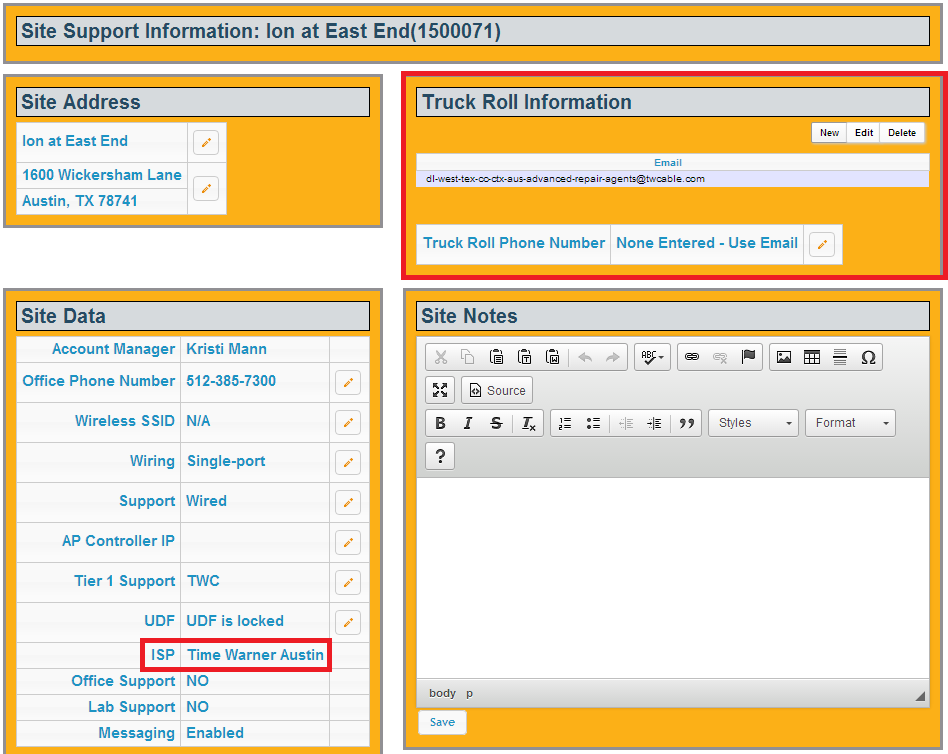
To find out who the locations current Truck Roll presence is, you must Identify who their ISP is. This information is located in KMC. It also displays Truck Roll information. You can also have them call their ISP contact for Truck Rolls.
A list of ISP contacts for truck-rolls can also be located HERE.
Who pays for truck rolls?
Depending on our service contracts with the property and/or our partners, either one of the following entities will be responsible for paying for truck rolls and trouble calls:
Property (Typical)
ISP
Korcett (Seldom)
Typically the property will pay for trouble calls, but verification of this requires looking the information up in the MSA, or Master Service Agreement.
What is an MSA? What is an SLA? What is the significance of each?
MSA Stands for Master Service Agreement and is the contract a property signs with Korcett to receive our services. In an MSA, a property agrees to pay a monthly fee, calculated by the number of beds times the negotiated rate, for a set amount of time in exchange for Korcett Service.
SLA Stands for Service Level Agreement and sets forth the standards that a property must receive in terms of support, service, and sales. It is key that all the terms of a SLA be met by Korcett at all times.
How do I obtain access to one of our tools or systems?
Ask your lead or manager for access to any systems you feel you need access to.
Where can I find the IP information for a given site?
All information regarding IP blocks can be found in the PMT under “Post Sales Activites: Equipment Logistics, Documentation”, on the page entitled “Site IP Documentation (MDF)”. This information will be located in the KMC in the near future but the WAN IP of the Korcett can be found in the KMC under the “Sites” tab.
What properties are we Tier 2 only for?
This information is available under the Site Support tab for a given site in the KMC. Reports that show all Tier 2 properties is in the works.
Who owns the switch equipment at a property that we are Tier 2 only for?
Typically the ISP, or whatever entity is tier 1 at the property.
What is Tier 1? 2? 3?
Tier 1 is defined as general informational calls, general connectivity, or physical connectivity. Tier 2 deals with accounts, and more complex issues that require advanced troubleshooting. Tier 3 is any issue that may require changes to be made to a single korcett or switch to be able to resolve the issue.
How do I find out who owns the wireless equipment at a property?
This information is available under the Site Support tab for a given site in the KMC. Reports that show all properties wireless ownership is in the works.
What is authentication?
Authentication refers to the process of managing bandwidth by matching devices to accounts to determine how much bandwidth should be allotted for the device.
Our KMC contains the master database for all the authenticated devices across the country. Each property’s Korcett has it’s own database as well which is filled from the KMC, just with only the properties data, not others. Every authenticated device has it’s MAC address in an account within the database.
When a device tries to get to the internet the Korcett checks to see if the MAC resides in it’s database. If it does not the Korcett redirects the device to the KMC so that it can be registered and added to the database. Once the device is added to the KMC database, the KMC also updates the Korcett database with the new account – This process is calling Syncing. Now the Korcett knows the device and allows it on the internet. The firewall and database work together so that whatever bandwidth tier is assigned to an account is provided to the MAC addresses on that account.
The term move-in mode or passive may come up at times. These terms refer to a Korcett that has authentication disabled. When authentication is disabled the firewall is no longer talking with the database to identify and match devices. Instead, all devices are allowed online and a default tier will be assigned to all devices. In some instances, no tier may be established rendering all bandwidth available without any form of management. NOC should be notified if this is discovered.
What is BoM (Bill of Materials)?
A BoM, or Bill of Materials, is an itemized listing of hardware required to install a Korcett network over an existing infrastructure. Every new property that Korcett takes on is given a BoM.
What is Single-Port and Multi-Port?
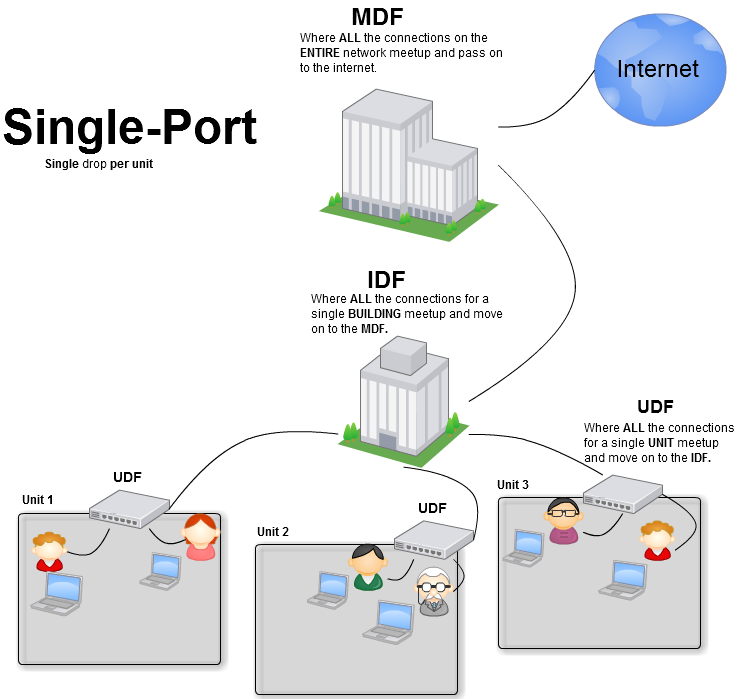
Single-Port and Multi-Port refers to the network architecture/design. Basically a single-port design has a single ethernet drop to a unit which connects to a small switch called a UDF (Unit Distribution Frame).
From there additional ethernet drops terminate within the unit to provide internet access to all the wall-jacks if available. Multi-port bypasses the UDF because multiple ethernet drops are provided to a single unit, with each cable connecting directly to a wall-jack.


Here are some illustrations of the Multi-Port and Single-Port design.
What is a MDF, IDF, and UDF?
MDF
Bandwidth/Internet comes to a property via fiber, terminating on an ISP Circuit or hand-off. This is where we come in…From here we distribute the bandwidth to the entire property over the existing fiber or Ethernet infrastructure. The location where the ISP hand-off is at is called the MDF, or Main Distribution Frame. Our Korcetts (Primary and backup), switches (Typically Dell 6224F and 6224C), APC, and Terminal Server are located here.
So think of the MDF as a hub or the brain of the network where all the connections from the property come back to and all network traffic passes through.
IDF
Every property is designed slightly different but in most cases the IDF, or Intermediate Distribution Frame, will be located at every building. The IDF is basically a smaller and simpler version of the MDF in that it distributes internet to various units for a specific building. The IDFs connected directly to the MDF via Fiber or Ethernet in some rare instances. A standard IDF will contain one or more switches (Typically Dell 3548) with ethernet connections going from each port to either a UDF, AP, or unit wall-jack. So if a resident, in building A tries to go to google their data passes through the IDF, to the MDF, to the internet, and then back down to the user.
UDF
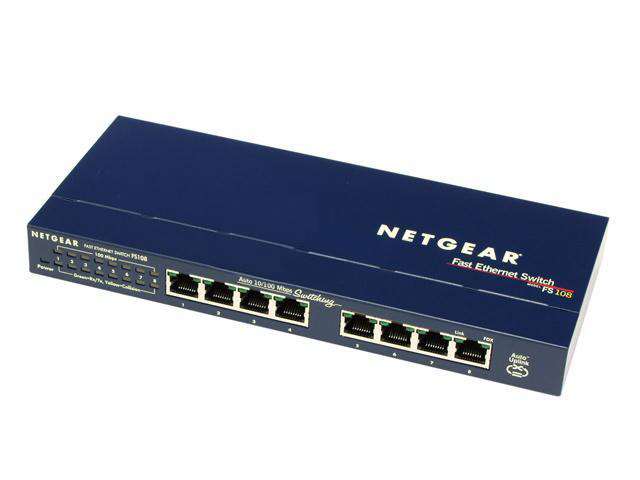
A UDF is an even smaller version of an IDF in that it distributes internet for a specific unit. A UDF will contain a small 8-16 port switch (Usually Netgear) and have a single ethernet connection (uplink) going to the IDF as well as ethernet drops to each wall-jack or an AP. You will see these only in Single-Port properties.
All of this together looks something like this: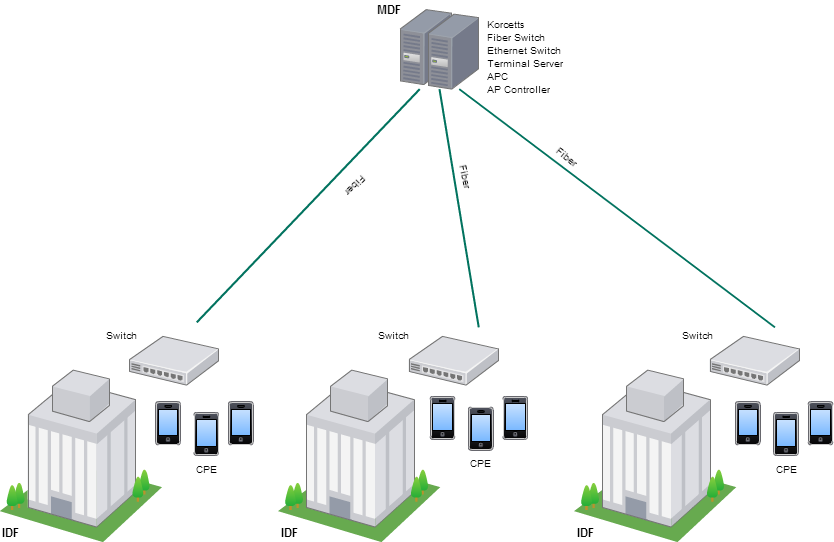
Can we forward or block ports if requested?
We do not block ports or forward ports for anyone. We can refer them to portforward.com as a self-help reference.