Temporary
Overview
Job Role
Complete Tablet Solutions has provided locked down (MDM) iPhone 11s to the employees of Nielsen. Almost all devices are iphone 11. Some are still older iPhones, but any remaining will be swapped soon. ContactWorks will receive calls from Nielsen employees for assistance.
Basic Information
- Verizon is the only mobile carrier in the Nielsen environment
- ContactWorks Direct Queue Phone Number: (512) 615-3913
- Nielsen Internal Support Line for immediate needs that we can’t address: (800) 237-9720 – Option 2 – Then they receive the following options:
- Press 1: Tech Support
- Press 2: PC Support
- Press 3: Specialized Services
- Press 4: Equipment
- Press 5: Electronic Verification Services (EVS)
. We will not refer anyone to the email address –fieldspecializedservices@nielsen.com
- New lines of service will ship via FedEx 2-day.
(Goal is to try to get the phones by Friday of that week) - Replacement drives ship overnight
- A new line of service iPhone 11 will come with the following accessories:
- Wall charger
- Apple lightning cable: USB C to Lightning Cable
- Ear buds – Lightning connector
- Ear buds – 3.5mm jack
- Car Charger: USB A to Lightning Cable
- Otterbox Defense series case and holster (installed on devices)
IVR
Each caller hears the following before being put in the call queue.
“Thank you for calling Nielsen Mobility Support Center. This call may be monitored for quality assurance. To optimize your support experience and avoid additional phone calls, please call from a phone other than the mobility device you are calling about. Please hold and your call will be answered by the next available agent.”
If it is taking time for someone to answer the call, the caller should hear:
“We apologize for the delay. All of our mobility support representatives are currently supporting other callers. Rather than wait on hold, please press 1 at any time to leave a voicemail and we will call you back as soon as a mobility support representative is available. Please provide your name, the reason for your call, and the best telephone number to reach you at. Otherwise, please remain on hold and somebody will be with you shortly.
Phone Answering Script
“Thank you for calling Nielsen Mobility Support. This is [YOUR NAME] speaking. Can I please have your first and last name?”
“Can I please get a good contact phone number?”
“How may I help you today?”
CTS Mobility – Support Website Portal
Login Information
URL: https://portal.ctsmobility.com
Login Type: Of the three options, select: Email Link
Email Address: nielsen@contactworks.us
Support > Request Service
- iPhone Replacement
- If you can’t get an iPhone working through troubleshooting, or the caller makes a specific request to replace their phone, fill out this form.
- Cold Transfer Log
- Fill out this form every time you directed anyone to the 800 number.
Support > Report a Problem
- MDM Support
- A user reported an MDM related issue
- add/remove apps or features
- MDM iphone login credentials
- Passwords / nTime
- Application isn’t working as intended
- A user is having an error on their device
- Issue with a specific error code
- A user reported an MDM related issue
- Orders
- If someone has a problem with their order
Workspace One – Pushing MDM Profiles to the phone
(information pending)
Out of Scope Support
OUT OF CONTACTWORKS SUPPORT
- Examples of out of scope requests:
- Transfers of Liability
- Bring your own Device
- Feature Change Request
- Port (Change of Carrier)
- Refer these callers to 1-800-237-9720 option 2.
- ALSO – Ticket all out of scope calls in the CTS Mobility Portal under Request Service > Cold Transfer Log)
OUT OF EVERYONE’S SCOPE
- Any 3rd party information such as asking for help with an Apple ID or a google login. Refer the person to the 3rd party for assistance.
- Replacement accessories after the initial kit has been deployed
- Wanting to use a device other than what was provided is not permitted at this time.
- “Corporation to personal” transfer of liability is not permitted. If it
- (All out of scope tickets are logged in the CTS Mobility Portal under Request Service > Cold Transfer Log)
NIELSEN OUT OF SCOPE – Referred back to us
If you find that PC Support is referring Nielsen employees back to us, then we’re just going to take their information and fill out a CTS Mobility Portal form > Report a Problem > A user reported an MDM related issue
Escalating (transfer not working, just give the caller the phone number and option to dial for the moment)
CTS prefers if we cold transfer out of scope calls. Follow the steps below.
Scripting
“Let me get you transferred to a team member who should be able to better assist you. Please remember to select option 2 for further assistance. After hitting 2, you will hit 1 for PC support and 2 for Network support.”
We will be transferring them to phone number 1-800-237-9720 – option 2
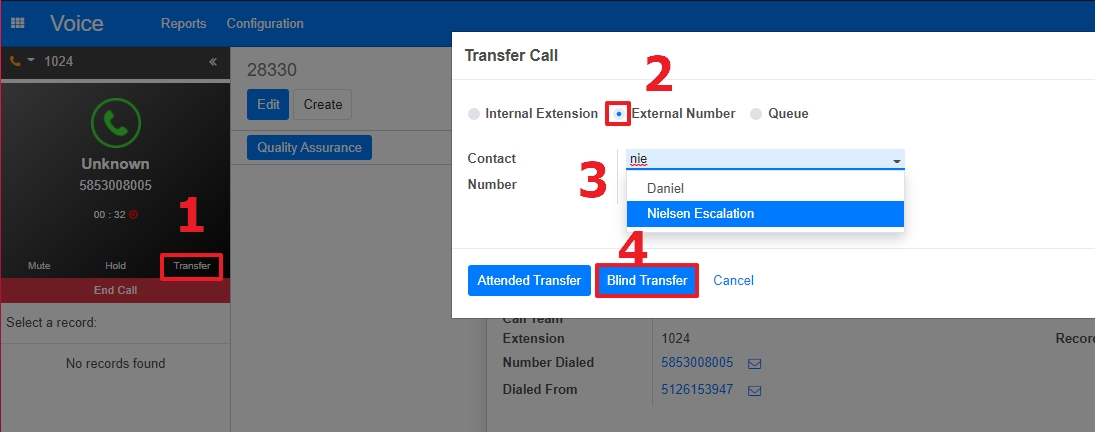
- While on the call, click the Transfer button.
. - On the pop-up, select External Number
. - For the Contact, start to type, then select Nielsen Escalation
. - The Number field should auto populate. Just click Blind Transfer to finish the process.